Workshop Practice Pack
Type less. Practice the Canvas tools.
Copy these prompts, answers, directions, points, and feedback exactly. The goal is to build, configure, and preview each New Quizzes format.
Hot Spot
Locate a workplace safety hazard
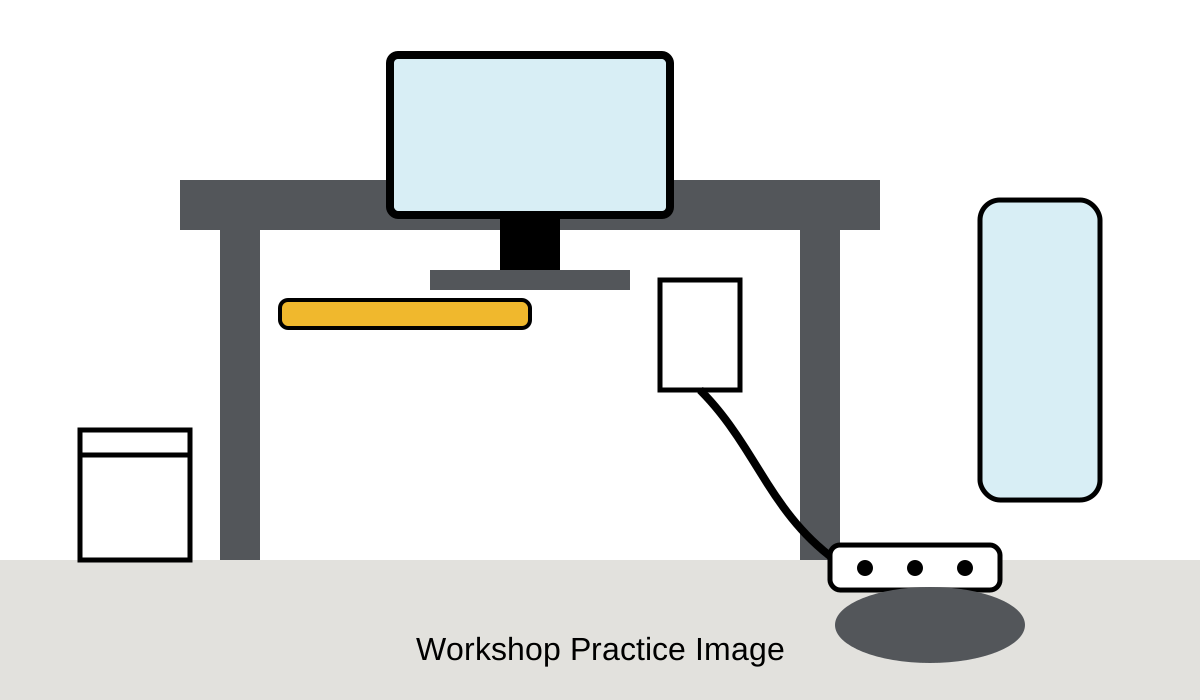
Question title: Workshop Practice: Hot Spot
Prompt: Select the spill located beside the power strip.
Directions: Click once inside the dark spill on the floor near the power strip.
Correct target: Draw the target area around the dark oval spill near the lower-right side of the image.
Points: 2
General feedback: The spill beside the power strip creates an electrical safety hazard.
Image alternative text: Office workstation with a desk, computer, chair, wastebasket, power strip, and a dark spill on the floor beside the power strip.
Ordering
Arrange a four-step process
Question title: Workshop Practice: Ordering
Prompt: Arrange the steps in the correct order.
Directions: Drag each item into the correct position from first to last.
Correct order:
- Review the requirements.
- Prepare the required materials.
- Submit the completed work.
- Check the final result.
Points: 4
General feedback: Review, prepare, submit, and then verify the result.
Categorization
Sort technology examples
Question title: Workshop Practice: Categorization
Prompt: Sort each item into the correct technology category.
Directions: Drag every item into Hardware, Software, or Network.
| Category | Items |
|---|---|
| Hardware | Monitor Keyboard |
| Software | Word processor Antivirus program |
| Network | Router Wireless access point |
Points: 6
General feedback: Hardware is physical equipment, software is a program, and network devices connect systems.
Stimulus
Create shared context with connected questions
Stimulus title: Workshop Practice: Service Request
Stimulus content:
A faculty member reports that a classroom computer will not connect to the internet. The monitor and keyboard are working. Other computers in the room are connected successfully. The network cable on the affected computer appears loose.
Connected Question 1: Multiple Choice
Prompt: Which action should happen first?
Answer choices:
- Replace the monitor.
- Reconnect the network cable.
- Install a word processor.
- Restart every computer in the room.
Correct answer: Reconnect the network cable.
Points: 2
Correct-answer feedback: Correct. The loose cable is the most direct issue described in the service request.
Incorrect-answer feedback: Review the details that identify what is working and what appears to be disconnected.
Connected Question 2: Multiple Choice
Prompt: Which detail best shows that the problem is limited to one computer?
- The monitor is working.
- The keyboard is working.
- Other computers in the room are connected.
- The faculty member reported the issue.
Correct answer: Other computers in the room are connected.
Points: 2
Multiple Choice
Build one stand-alone selection question
Question title: Workshop Practice: Multiple Choice
Prompt: Which step should happen immediately before submitting completed work?
- Check the final result.
- Prepare the required materials.
- Review the requirements.
- Submit the completed work.
Correct answer: Prepare the required materials.
Points: 2
Correct-answer feedback: Correct. Materials are prepared before the work is submitted.
Incorrect-answer feedback: Review the four-step process used in the Ordering example.
Preview Check
Verify the tools, not the writing
For each question, verify:
- The prompt and directions display correctly.
- The correct response or scoring setup works.
- The point value is correct.
- Feedback appears as intended.
- The student interaction is usable in preview.